Do you have someone in your family, who constantly forgets about your birthday? If not, then I’ve got bad news: it’s you! In my family it has always been me, so every year my kids have to remind me of the birthdays of my mother, sister, nieces, nephews, sometimes I would even forget my own birthday! But to be fair, our family is so big, that anyone would have a hard time remembering all the important dates. So I have been trying to come up with ways to memorize important dates and birthdays:

- Facebook: Facebook sends you updates every time someone’s birthday is coming up but you have got to check your account daily and some people hide their birthday, which makes the idea flawed.
- Apps: There are so many apps nowadays, including ones, that send you birthday updates. However, we already have so many apps on our phones, for work, for reading, for music, for podcasts, etc, who needs another one?
- Don’t make friends: No friends – no birthdays to remember!
- I will not torture you anymore, there is a great solution: a perpetual calendar with birthdays. In this article, I will talk about the Photo Calendar Creator and guide you throughout the entire process.
How to create a perpetual calendar with birthdays
- Download the free version of the program by clicking on the link below:
http://photo-calendar-software.com/
- Go to New project select Custom Calendar and Perpetual Calendar for any year.
- Choose a suitable template, I have taken the last one because it gives more space for photos.
- Do not make any changes further, click Next and you will see this layout:
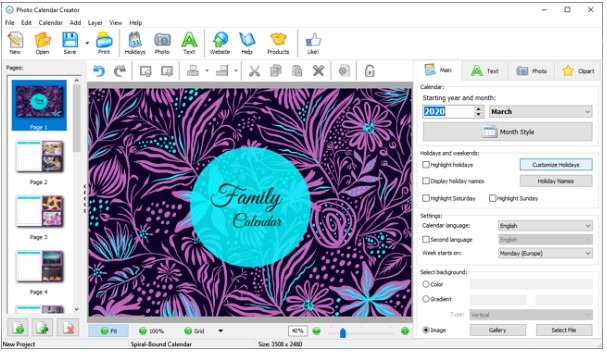
- Now go to the current month and choose the best photos from your PC. It could be your sister’s birthday, or wedding anniversary. Choose the theme! Click on the photo on the slide and go to Replace photo, you may also crop it, if necessary.
- If you don’t like the background, like me, you can simply change it, by clicking on Image and Gallery and choose one from the huge variety of options.
- Now if you don’t like the tacky purple frames around your photos, don’t worry, simply delete them (select and press delete), then go to Select Frame and pick a better one. When you are satisfied with your layout, right-click on the slide and duplicate it, thus creating the same slide for the following month. You can also change photos and background if you want to have a unique look for every month.
- Time to fill out the calendar! Click Customize holidays and add all the birthdays, anniversaries, weddings, etc, that you would like to be reminded of.
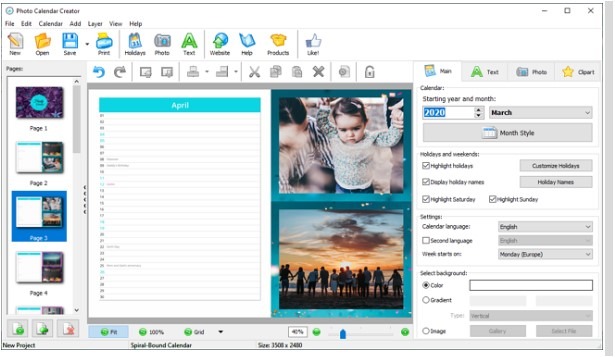
- If you want to see the dates displayed on the calendar, tick the checkbox and you’re all set! Print it and hang it up on the wall and you’ll become a birthday wizard!
All in all, the software allows you to create something special for you and your family. Furthermore, it is very easy to use and you will have lots of fun working with it. Whether you are a computer geek or a modest beginner, you will master this program very quickly and enjoy making your personal family calendar. We wish you a creative and inspirational day together with Photo Calendar Creator!

I’m a 20-something stay-at-home mother and wife. I have an amazing husband, a beautiful daughter, two loving dogs, and a lazy cat. I wouldn’t change my life for anything! I love to read, listen to music, cook and blog!


Speak Your Mind