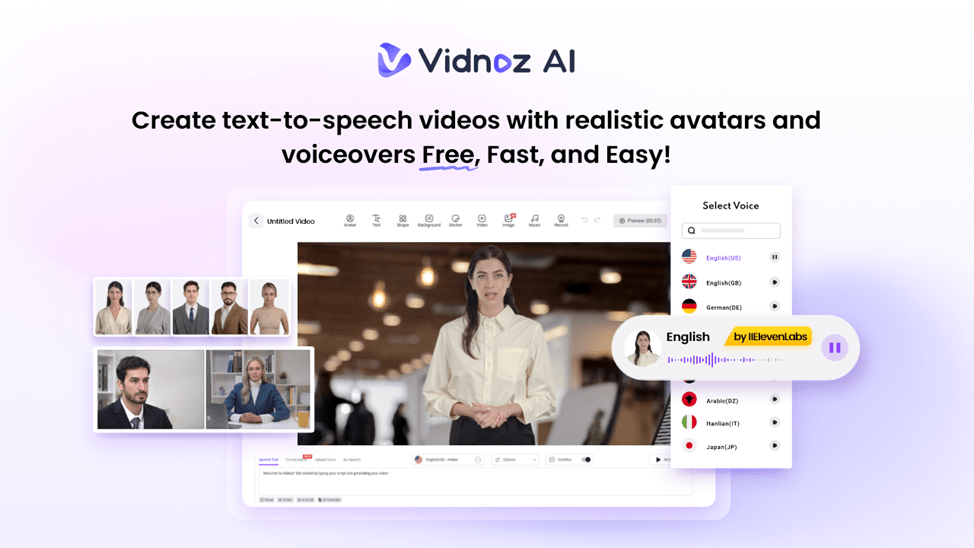
Vidnoz AI is a powerful platform that uses AI to help you create engaging videos with very little effort. It is perfect for a variety of users including educators who can make instructional videos and marketers for creating promotional content. Vidnoz AI enables you to produce professional-quality videos without needing advanced editing skills. This is true with its easy-to-use interface and automated features.
Top-Tier Security Standards
One of the best aspects of Vidnoz AI is its strong focus on data security. It has earned ISO 27001:2022 certification. It means your data is managed with the highest level of care and follows international standards for information security. This certification gives you peace of mind. This is especially true if you are a business or an individual concerned about data privacy.
Key Features of Vidnoz AI
Let’s have a look at the amazing features of Vidnoz AI video generator.
1. 1830+ Lip Sync AI Voices
Vidnoz AI offers over 1,830 AI voices that sync perfectly with the avatars. This variety allows you to choose the ideal voice for your content to improve the viewing experience. Vidnoz AI has the right AI voices options for all your voiceover needs.
2. 2800+ Pre-Designed Templates
Vidnoz AI makes it easy to start your video projects with more than 2,800 templates available in multiple languages. These templates cater to different industries and purposes. These are helping you to create customized videos quickly. No matter what your niche is, you are sure to find a template that fits your needs.
3. Dual-Avatar Conversation Mode
The Dual-Avatar Conversation Mode is a unique feature that allows two avatars to have a conversation. This is great for creating interactive content such as interviews or customer support scenarios. This is making your videos more engaging and dynamic.
4. Easy AI Video Editor
The Easy AI Video Editor is designed for everyone. You can customize your videos without hassle with simple controls. Whether you want to adjust voiceover timing or add background music, the editor makes the video-making process straightforward.
5. Free to use
Vidnoz AI offers a free tier that lets you create up to three minutes of video content each day. This is a great option for individuals or businesses wanting to explore the platform without any financial commitment.
6. AI Video Wizard
The AI Video Wizard guides you through the video creation process step by step. This feature is perfect for beginners who might feel intimidated by the technology. You can easily produce high-quality videos with helpful prompts and suggestions.
7. 1600+ Realistic Avatars
Vidnoz AI offers over 1,600 realistic avatars that represent different professions and roles. These include doctors, teachers, customer service representatives, and more. This variety allows users to choose avatars that fit their content. This ultimately is making it more relatable and engaging for viewers.
– Avatar Lite & Custom Avatar Pro
The platform includes Avatar Lite for quick avatar creation. On the other hand, Custom Avatar Pro offers more detailed customization.
You can change backgrounds With Custom Avatar Pro. It will even let you create a digital twin that can speak in over 40 languages. It will be mimicking your own voice.
– Motion Avatars
Vidnoz AI also features Motion Avatars. These make video making an exciting process. These avatars are able to move as normal including facial expressions and gestures. This assists in making your videos look more real. This aspect is excellent in making animated content which is attractive and engaging.
How to Use Vidnoz AI?
Here are the key steps you need to follow to create engaging videos using Vidnoz AI:
1. Sign Up or Log In
First log in to the account that you have in Vidnoz AI. It is all quick and easy to sign up on vidnoz AI even for a newbie. Vidnoz AI allows you to get started right away.

2. Choose a Template or Avatar
Check out the huge library of templates or avatar compatible with your video project. You are free to browse your way until you get what suits you the best in your content.

3. Customize Your Content
Make your video personal by including text, altering voiceovers, changing and tailoring other elements in the video to your vision. Take this opportunity to be creative and you can make the video your own.

4. Generate or Share
After making your video, generate it and upload on multiple networks to target your audience. Remember not to fail in promoting it to have maximum outreach and influence.

You will be able to create and share engaging videos in no time with these simple steps.
What Makes Vidnoz AI a good Choice?
Below are the pros and cons to know about.
- Users can create up to three minutes of video each day at no cost.
- Vidnoz AI offers millions of free resources, such as images and stickers. These assist you in enhancing your videos. These resources leave you with a variety of choices that would help to make your content more interesting and attractive.
- This platform is user-friendly and this is making it a comfortable experience to all people. This applies to people with and without technical experience.
- You would be able to make videos fast without having access to advanced editing skills. It is ideal to anyone who aims at creating content within a limited duration of time.
- Vidnoz AI has achieved the ISO 27001:2022 certification, ensuring your information is secured to a very high extent. You get to be secure that the information you send to the platform will be safe.
- You can distribute all your videos to commercial purposes without limitations. This will make you free to use your videos in business or marketing without the need to observe copyright matters.
Final Thoughts
Overall, vidnoz AI is an amazing ai video generator. It has made video creation faster, easier and more affordable for everyone. So, you must give it a try.

Hey welcome to my blog . I am a modern women who love to share any tips on lifestyle, health, travel. Hope you join me in this journey!

Speak Your Mind